DIY: Simple & cheap Reverse Back-up Camera


I doubt there is anyone who feels we have great rear visibility with our 5th Gens. One of the things that I insisted on having with my setup is a monitor that turns itself on and off with the power supply from the reverse light so that I never have to touch the monitor. So, I found this cheap wired system on Amazon for $54: Pyle PLCM36...
http://www.amazon.com/PLCM36-Univers...cense-Rearview
PROS:
1. Its CHEAP.
2. The monitor is awesome in that its small, turns on only when receiving power from the reverse light input, and comes with adequate mounting materials.
3. It has all the wires you need to make this easy.
4. Did I say its cheap?
CONS:
1. The camera that comes with this is a POS. It has only 90 degrees of visibility and does not offer a way to flip the image if you want a posterior mounting position like I chose.
2. Did I say the camera REALLY sucks?
So, I found the perfect camera for my needs with 180 degrees of visibility, optional screen-flip, and as a bonus, optional distance marker overlay.

Here is the link for the camera I got on ebay... its made by the guys who do the lockpic stuff -
Coastal E Tech BARCAM221 LockPick/MyGig/Gen 6 Camera:
http://www.coastaletech.com/LOCKPICK_CAMERAS.htm
I got mine on ebay for $79 to my door.... WORKS GREAT and shows beyond each bumper.
There are ALOT Of ways to do this and places to mount your video monitor.... but since I always turn around to back up, it only made sense to put the monitor on the back deck, ESPECIALLY since this is the easiest place to do the install

If you mount it right in the middle between the seats and right on the edge, it will be below the level of the window and not obscure your view in any way. I have it temporarily mounted with duct-tape at the LATCH-point behind the passenger-side rear seat.

MATERIALS NEEDED:
1. Tape: Electrical and Duct
2. Wire cutter/stripper
3. Solder iron (if you choose to do soldered connections)
4. Bent close-hanger or other wire to use as a fish
5. Flathead screwdriver or trim tool
6. Silicon Diode
Here are the steps:
STEP 1: Take off license plate and open the trunk.
STEP 2: Remove left-side black brake-light cover. (You MUST use the LEFT SIDE since the correct wire is not on the right!) There are three plastic pins which pressure-fit inside the clip. Pop these out with a small flathead screwdriver or trim tool. The clips then just lift out.

STEP 3: Use something (like a bent close-hanger) to fish your power line and video line from the left brake-light compartment and out the license plate area.

STEP 4: Disconnect the harness. Its here where you will find the light-green wire you need to tap. You'll need to open the plastic around the wires for about an inch. I used some electricians scissors, but you can use a razor blade or exacto. There is a black wire for splicing into for your ground also. I stripped back the light green wire with a razor blade and slipped the end of the diode into the insulation with the diode ring facing the harness. (sorry, i know its blurry) Soldering this here is ideal since this area does get exposed to water. The other option is to T-Tap it and splice in your diode there. ( I always use diodes to avoid any back-flow of current which could screw up your various BCMs/CPUs) Test and then tape it up. ***HINT: The reverse lights come on for about 30 seconds whenever you click the UNLOCK button on your FOB... makes it easy to test without having to start the car, and have someone there to put it in reverse)***

STEP 5: Now that you know it works, the next step is finding a way to get your power and video lines into the trunk. There are two options... the first one I tried I eventually abandoned because I felt the metal edge was too sharp and the high risk of the lines eventually getting damaged. Someone else might want to do it this way though because it is a bit more “stealthy.”

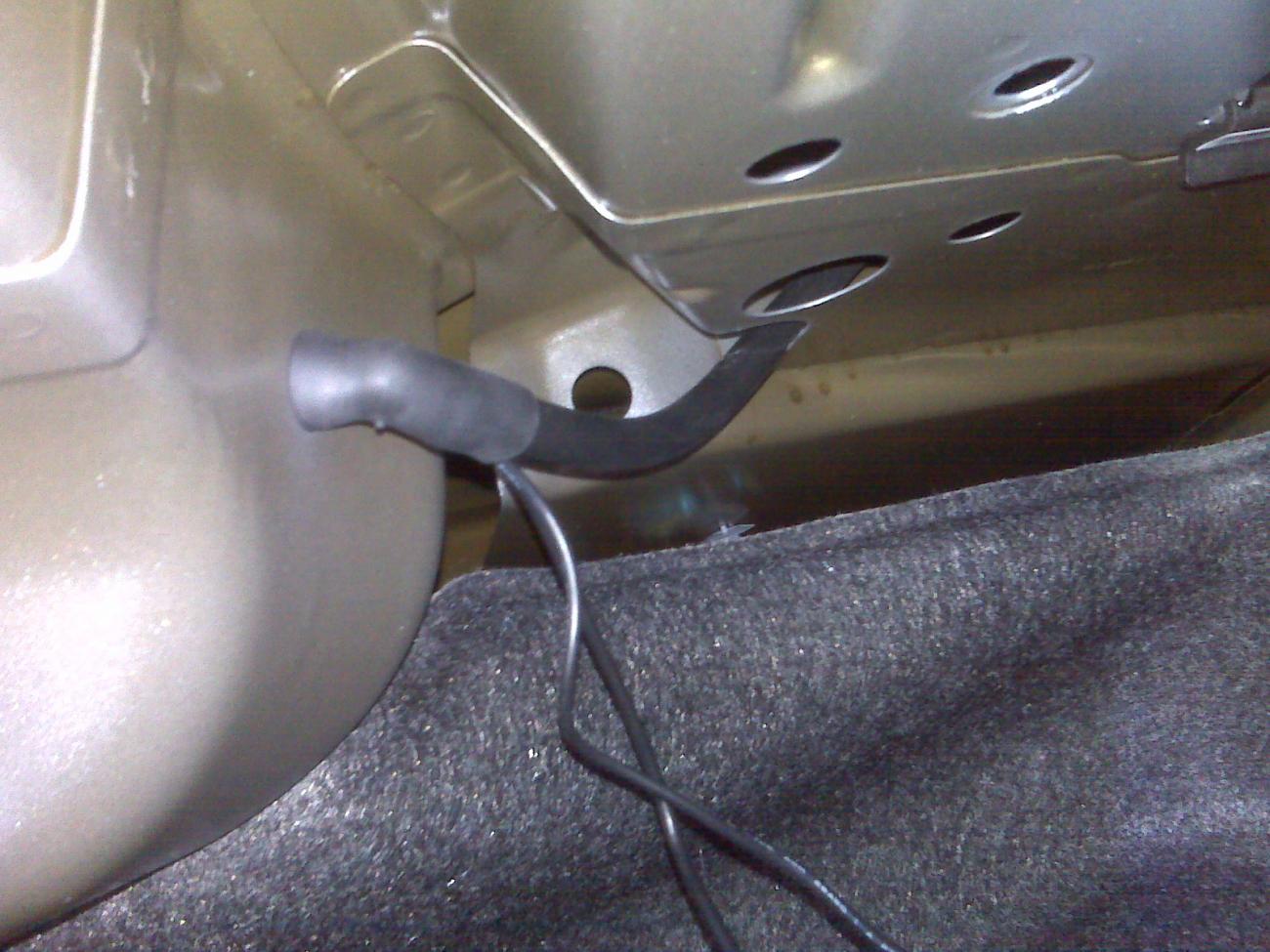
I found a different way via this grommet that attaches to a rubber hose inside the trunk. Just unplug the hose from the grommet inside the trunk and pass your wires through. Push the hose back in, and it appears to give in far enough to give you what looks like a water-tight seal. Regardless of how you do it, you will need to cut the video wire and then splice it back together, or solder it to a new plug. I had some spare plugs, so I chose to solder, but splicing should work fine too.

STEP 6: The rest all about running your lines inside the trunk and finding the place in the car to place your monitor.

