You are browsing camaro5 
 |

|
 10-19-2016, 11:03 PM
|
#309 |
|
I have a question since we are installing an aftermarket head unit regarding the backup camera. I have the factory backup camera in the mirror (2012) and would like to know if anyone has converted the factory camera to work with the aftermarket head units. Is there a harness. This would make the PAC conversion complete in my opinion.
__________________
There's more to life than gas mileage
LS3, Whipple, Custom Comp Cam, springs, pushrods, timing set, CAI intake, Apex cold air scoop, Doug Thorley TRI-Y headers, Billet Custom Products baffled Valve covers, Mighty Mouse Catch can, ADM FPCM, ZL1 fuel pump, MSD boost-a-pump, Hex Vent hood vents, ProSport gauges(fuel pressure, AFR, Boost), Corsa, 100 cell Cats. Jannetty remote tuned, Pfadt trailing arms, all parts user installed. No Dyno yet. Manual trans. 3.45 gears. |

|

|
|
10-19-2016, 11:25 PM
|
#310 | |
Drives: 2012 2SS, Silver, Borla S Type, CAI Join Date: Jun 2013
Location: Alabama
Posts: 96
|
Quote:
Here's the link: http://www.gen5diy.com/Dome-Harness/ Last edited by kain929; 10-19-2016 at 11:27 PM. Reason: Additional information |
|
|
|
|
|
10-20-2016, 09:19 AM
|
#311 |
     
|
pattern pilot..YES..i did that also......ALSO..if you use the gen5 dome light camera adapter, there are two types..one is to keep the mirror camera and rear camera working at same time...the other Option (for me was better) is to only show the rear camera on your headunit.......also.....if you talk to OFER (gen5) as them to make the pigtail RCA wire,,longer to read the headunit...when it comes from them its only 6" tail./ other then that the item works great,,,retains lines..it just splits the signal from mirror to headunit....have fun...
|
|
|
|
|
10-20-2016, 01:34 PM
|
#312 | |
|
|
Quote:
 I called and ordered the harness. He does not make the pigtail (RCA) longer to the aftermarket head unit, I just have to get an extension.
__________________
There's more to life than gas mileage
LS3, Whipple, Custom Comp Cam, springs, pushrods, timing set, CAI intake, Apex cold air scoop, Doug Thorley TRI-Y headers, Billet Custom Products baffled Valve covers, Mighty Mouse Catch can, ADM FPCM, ZL1 fuel pump, MSD boost-a-pump, Hex Vent hood vents, ProSport gauges(fuel pressure, AFR, Boost), Corsa, 100 cell Cats. Jannetty remote tuned, Pfadt trailing arms, all parts user installed. No Dyno yet. Manual trans. 3.45 gears. |
|
|
|
|
|
10-20-2016, 06:25 PM
|
#313 |
|
KNGTFALL
Drives: 2012 2SS 45th edition Join Date: Aug 2012
Location: (Near) Charlotte, NC
Posts: 1,533
|
I was wondering what everyone is doing with their Microphone. I was going to run it up to where the factory one is but wondering what everyone else has done.
|
|
|
|
|
10-20-2016, 09:42 PM
|
#314 | |
|
Drives: 2012 2SS, Silver, Borla S Type, CAI Join Date: Jun 2013
Location: Alabama
Posts: 96
|
Quote:
|
|
|
|
|
|
10-20-2016, 09:51 PM
|
#315 | |
|
Drives: 2012 2SS, Silver, Borla S Type, CAI Join Date: Jun 2013
Location: Alabama
Posts: 96
|
Quote:
|
|
|
|
|
|
10-20-2016, 10:45 PM
|
#316 | |
 
Drives: '11 SGM 1LT/RS, '02 SOM Firehawk Join Date: Jan 2014
Location: near Chicago
Posts: 451
|
Quote:
__________________
Yippee38
 |
|
|
|
|
|
10-20-2016, 10:55 PM
|
#317 |
|
|
me and beast ran the microphone from headunit while its open,,to the front center speaker..remove speaker..(junk) and secure mic.
and also you can put the antenna in that area also for better reception. speaker sounds great also.. 
|
|
|
|
|
10-21-2016, 12:32 AM
|
#318 | |
|
|
Quote:
On the microphone location, I ran it to the top of the steering column and it resides between my fuel pressure gauge and shift light. Out of site.
__________________
There's more to life than gas mileage
LS3, Whipple, Custom Comp Cam, springs, pushrods, timing set, CAI intake, Apex cold air scoop, Doug Thorley TRI-Y headers, Billet Custom Products baffled Valve covers, Mighty Mouse Catch can, ADM FPCM, ZL1 fuel pump, MSD boost-a-pump, Hex Vent hood vents, ProSport gauges(fuel pressure, AFR, Boost), Corsa, 100 cell Cats. Jannetty remote tuned, Pfadt trailing arms, all parts user installed. No Dyno yet. Manual trans. 3.45 gears. |
|
|
|
|
|
10-21-2016, 03:48 AM
|
#319 |
|
Drives: 2011 2SS Black w/Orange Stripes Join Date: Aug 2010
Location: Tampa, FL
Posts: 309
|
rydahog, how did you secure both of those in that area, do you by chance have pics? Thanks!
|
|
|
|
|
10-21-2016, 06:16 AM
|
#320 | |

Drives: 2013 Join Date: Dec 2013
Location: Germany Blankenhagen
Posts: 81
|
Quote:
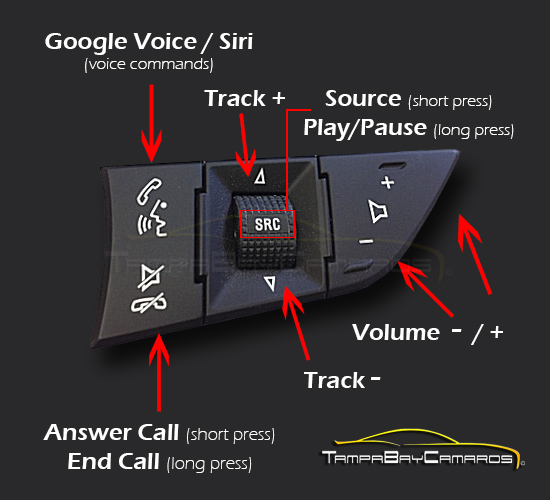
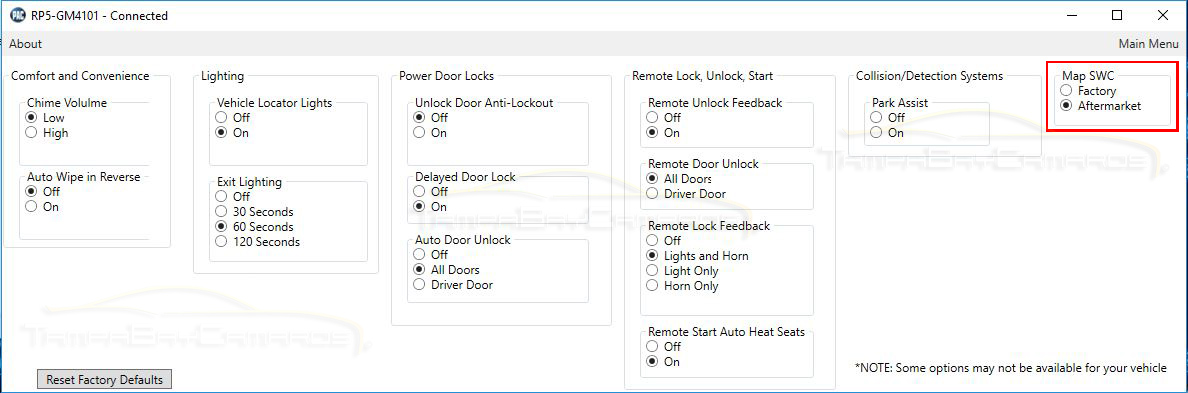
i have read your great write up about this kit. Wow, so many information. I have had the PAC-UP and have updated the firmware. Then i have reprogramed my SWC functions for Germany without OnStar. Thank you very much. Now i can answer to a call and i can end a call with SWC. I will give the link of your website to the german camaro drivers. I have bought a StarTechcom 61cm Intern 5 pin USB IDC Motherboard Header Kabel F/F and have exchanged the pins at this cable, so i have connected this cable to the interface, the other end i can reach in the glove compartment. So i can update the interface at any time. Thank you very much. best regards from Germany Egbert Gertz
__________________
Chevrolet Camaro - V8 - MT - 2013 - European Version - Inferno Orange/ Inferno orange - ACC Sidemarker ghosted - Dash Kit PAC RPK5-GM4101 with DNX8170DABS - Amp KAC-8406 - Sub Pioneer TS-WX110A - Rear- and Front-Camera - ACC Mail Slot Scanner RGB - Pedders Sportsryder - painted parts in engine compartment - black powder coated original rims - H & R wheel plates 20mm front and rear axle - 1 LE steering wheel - MGW Short shifter replacement - aluminum door Pins - ACS T4 Splitter - us-mirrors - ZL1 side rockers - High Wing Spoiler
|
|
|
|
|
|
10-21-2016, 09:15 AM
|
#321 | |
|
|
MIC
Quote:
|
|
|
|
|
|
10-21-2016, 04:20 PM
|
#322 | ||||
|
KNGTFALL
Drives: 2012 2SS 45th edition Join Date: Aug 2012
Location: (Near) Charlotte, NC
Posts: 1,533
|
Quote:
Quote:
Quote:
Quote:
|
||||
|
|
|
|
|
|
|
 |
|
|