Camaro5 Chevy Camaro Forum / Camaro ZL1, SS and V6 Forums - Camaro5.com
 
dave@hennessey
Go Back   Camaro5 Chevy Camaro Forum / Camaro ZL1, SS and V6 Forums - Camaro5.com > General Camaro Forums > Camaro Photos | Spyshots | Video | Media Gallery


Reply
 
Thread Tools
Old 10-17-2012, 01:34 AM   #15
kenkartasasmita
COTW [4/23/12]
 
kenkartasasmita's Avatar
 
Drives: Camaro Of The Week.
Join Date: Aug 2011
Location: San Diego, CA
Posts: 2,088
it is pretty boring.. but... interesting video... nice job.
__________________
Quote:
Originally Posted by Nightfall View Post

C.A.M.A.R.O- Constantly Adding Modifications Addiction Relentless Obsession

2010 Camaro V6 1LT | Kooks Catback Exhaust + MBRP exhaust tips | TF3 Stripes | GM Transformers Emblem and Door Sill | Stillen splitter | GMX rear diffuser | K&N CAI | Pulstar iridium spark plugs. | Gm High Wing Spoiler | BBK LT Headers | BMR 4 Point Strut Bar | BMR 1" Lowering Springs | ZL1 Side Skirt | Black Ice-olator | Trifecta Tune |

My Build Thread
kenkartasasmita is offline   Reply With Quote
Old 10-17-2012, 01:40 AM   #16
Vengeance Graphix


Vengeance Graphix's Avatar
 
Drives: 2017 Corvette Grand Sport
Join Date: May 2010
Location: Central NJ
Posts: 10,870
Quote:
Originally Posted by kenkartasasmita View Post
it is pretty boring.. but... interesting video... nice job.
indeed it is boring to watch but it is interesting if you're into the graphic stuff
__________________
Vengeance Graphix is offline   Reply With Quote
Old 10-17-2012, 07:48 AM   #17
SSdude
 
SSdude's Avatar
 
Drives: Super Sport
Join Date: Aug 2010
Location: NJ
Posts: 495
Awesome. Very enlightening . I'm hoping its as easy as you make it look though.
__________________
SSdude is offline   Reply With Quote
Old 10-17-2012, 08:23 AM   #18
Wantconvertible

 
Wantconvertible's Avatar
 
Drives: 2011 SS/RS VERT
Join Date: Mar 2010
Location: PHILA PA
Posts: 1,615
Cool
__________________
Wantconvertible is offline   Reply With Quote
Old 10-17-2012, 10:41 AM   #19
ForgedReality
Envy
 
ForgedReality's Avatar
 
Drives: 2011 SGM 2SS/RS - Black hood/hockey
Join Date: Aug 2011
Location: Renton, WA
Posts: 915
Is there a reason you convert the path to a selection? Why not just use a vector mask and turn the whole layer into a smart object from there? That way, you can always alter the mask later, and every time you distort/resize/transform the layer, you aren't further degrading it since the smart object always refers to the original, not a scaled/transformed version. There's way more flexibility there.

You could even make the reflection layer based on the same smart object, so that when you change one, the other changes as well. For example if you were to paint on a decal or change the selection of the original, it would be "reflected" in the reflection. Time savers.
ForgedReality is offline   Reply With Quote
Old 10-17-2012, 03:01 PM   #20
IOM Black Diamond
HT5 COTW 1/21/13
 
IOM Black Diamond's Avatar
 
Drives: 2010 Camaro Inferno 2SS RS 6M
Join Date: Apr 2011
Location: Pleasant Hill, Or
Posts: 2,486
WOW great vid. Thanks for the info
__________________
IOM Black Diamond is offline   Reply With Quote
Old 10-17-2012, 04:33 PM   #21
Vengeance Graphix


Vengeance Graphix's Avatar
 
Drives: 2017 Corvette Grand Sport
Join Date: May 2010
Location: Central NJ
Posts: 10,870
Quote:
Originally Posted by ForgedReality View Post
Is there a reason you convert the path to a selection? Why not just use a vector mask and turn the whole layer into a smart object from there? That way, you can always alter the mask later, and every time you distort/resize/transform the layer, you aren't further degrading it since the smart object always refers to the original, not a scaled/transformed version. There's way more flexibility there.

You could even make the reflection layer based on the same smart object, so that when you change one, the other changes as well. For example if you were to paint on a decal or change the selection of the original, it would be "reflected" in the reflection. Time savers.
Ill have to try doing that, like i said im always learning new stuff and news ways about doing things with the program and was self taught so i don't know all the shortcuts to everything but thanks for the advice tip

Quote:
Originally Posted by IOM Black Diamond View Post
WOW great vid. Thanks for the info
No problem
__________________
Vengeance Graphix is offline   Reply With Quote
Old 10-17-2012, 08:50 PM   #22
roberbunch
 
Drives: bmw
Join Date: Oct 2012
Location: nice
Posts: 6
This makes me think twice before asking you for photoshop work
__________________
roberbunch is offline   Reply With Quote
Old 10-17-2012, 10:51 PM   #23
LoneStar


LoneStar's Avatar
 
Drives: 2011 IOM Camaro
Join Date: Jul 2010
Location: Texas
Posts: 3,446
Thank you for the instructional video! You da' man!

I decided to give it a shot (with a different but similar program). Grade me, please!!!

__________________
LoneStar is offline   Reply With Quote
Old 10-17-2012, 11:00 PM   #24
Vengeance Graphix


Vengeance Graphix's Avatar
 
Drives: 2017 Corvette Grand Sport
Join Date: May 2010
Location: Central NJ
Posts: 10,870
Quote:
Originally Posted by LoneStarCamaro View Post
Thank you for the instructional video! You da' man!

I decided to give it a shot (with a different but similar program). Grade me, please!!!
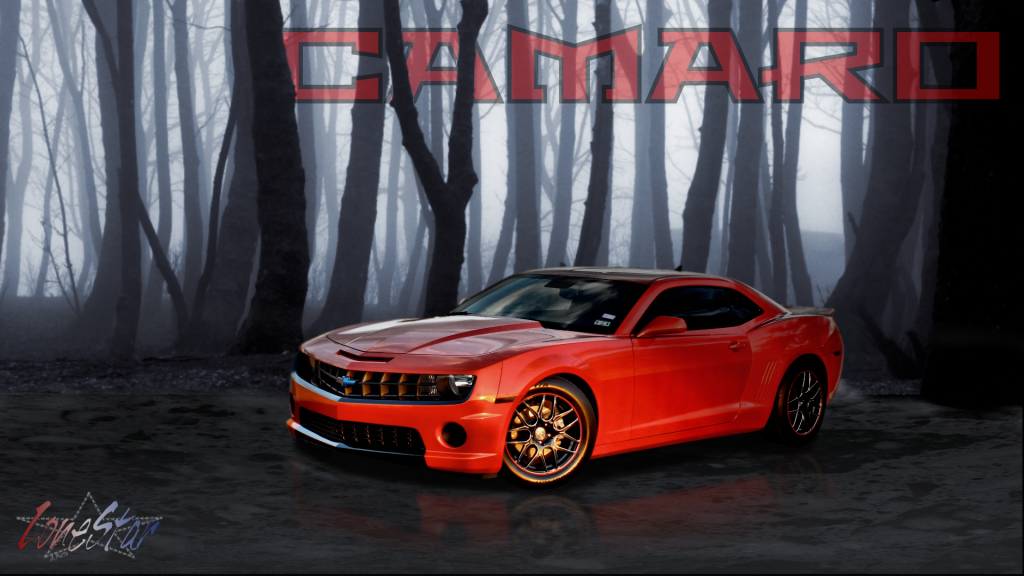
Looks good! you pretty much did all the stuff ive mentioned. Just a few things that you might want to consider. adding in some glows for the lights/ beams of light. maybe adding some color to the background (optional of course) color in the background can change a picture dramatically. And also darken the bottom corners slightly not a lot just a little. It will draw attention to the car more. just my personal opinion. You have the file on hand so try a few things out. Looks great though. Id give it an A+
__________________
Vengeance Graphix is offline   Reply With Quote
Old 10-17-2012, 11:02 PM   #25
Vengeance Graphix


Vengeance Graphix's Avatar
 
Drives: 2017 Corvette Grand Sport
Join Date: May 2010
Location: Central NJ
Posts: 10,870
Quote:
Originally Posted by roberbunch View Post
This makes me think twice before asking you for photoshop work
lol no worries, feel free to ask me
__________________
Vengeance Graphix is offline   Reply With Quote
Old 10-17-2012, 11:09 PM   #26
LoneStar


LoneStar's Avatar
 
Drives: 2011 IOM Camaro
Join Date: Jul 2010
Location: Texas
Posts: 3,446
Quote:
Originally Posted by xVengeancex28 View Post
Looks good! you pretty much did all the stuff ive mentioned. Just a few things that you might want to consider. adding in some glows for the lights/ beams of light. maybe adding some color to the background (optional of course) color in the background can change a picture dramatically. And also darken the bottom corners slightly not a lot just a little. It will draw attention to the car more. just my personal opinion. You have the file on hand so try a few things out. Looks great though. Id give it an A+
Thanks! I desaturated and darkened the background for an eerie look (going with the "Limbo" video game style artwork). And just forgot to darken the corners. I'll definitely keep at it though! Thanks again for putting the video together!
__________________
LoneStar is offline   Reply With Quote
Old 10-17-2012, 11:25 PM   #27
Vengeance Graphix


Vengeance Graphix's Avatar
 
Drives: 2017 Corvette Grand Sport
Join Date: May 2010
Location: Central NJ
Posts: 10,870
Quote:
Originally Posted by LoneStarCamaro View Post
Thanks! I desaturated and darkened the background for an eerie look (going with the "Limbo" video game style artwork). And just forgot to darken the corners. I'll definitely keep at it though! Thanks again for putting the video together!
It still looks good! it all depends on what "you" were going for.
__________________
Vengeance Graphix is offline   Reply With Quote
Old 10-17-2012, 11:28 PM   #28
LoneStar


LoneStar's Avatar
 
Drives: 2011 IOM Camaro
Join Date: Jul 2010
Location: Texas
Posts: 3,446
Quote:
Originally Posted by xVengeancex28 View Post
It still looks good! it all depends on what "you" were going for.
Thanks! Quick question: what's the best way to add fog to pics? I wanted to add some to the foreground...
__________________
LoneStar is offline   Reply With Quote
 
Reply


Posting Rules
You may not post new threads
You may not post replies
You may not post attachments
You may not edit your posts

BB code is On
Smilies are On
[IMG] code is On
HTML code is Off

Forum Jump


All times are GMT -5. The time now is 11:20 AM.


Powered by vBulletin® Version 3.8.9 Beta 4
Copyright ©2000 - 2026, vBulletin Solutions, Inc.